You can now attach a Git repository as a folder in TextQL's Ontology. Ana can read its files alongside the rest of your business context, while your team continues maintaining them in the source repo.
Build on years of existing models
Many enterprises have spent years building data models in dbt, with the SQL, descriptions, and catalog metadata stored in Git. Those repositories capture how the company models its business: how customers are represented, how transactions relate to accounts, and which definitions apply across business units.
Attach that repository and Ana can use its existing patterns to generate new data models and automate recurring modeling work. A new model can follow the naming conventions, joins, and business definitions your team has already established.
Analysts keep the same repositories, pull requests, checks, and review process. Their models and documentation become context for conversational analytics through the Ontology, without moving the source files or maintaining a separate export.
Several repositories, one file tree
The same approach works for semantic-layer definitions, BI modeling projects, and engineering or governance documentation already maintained in Git.
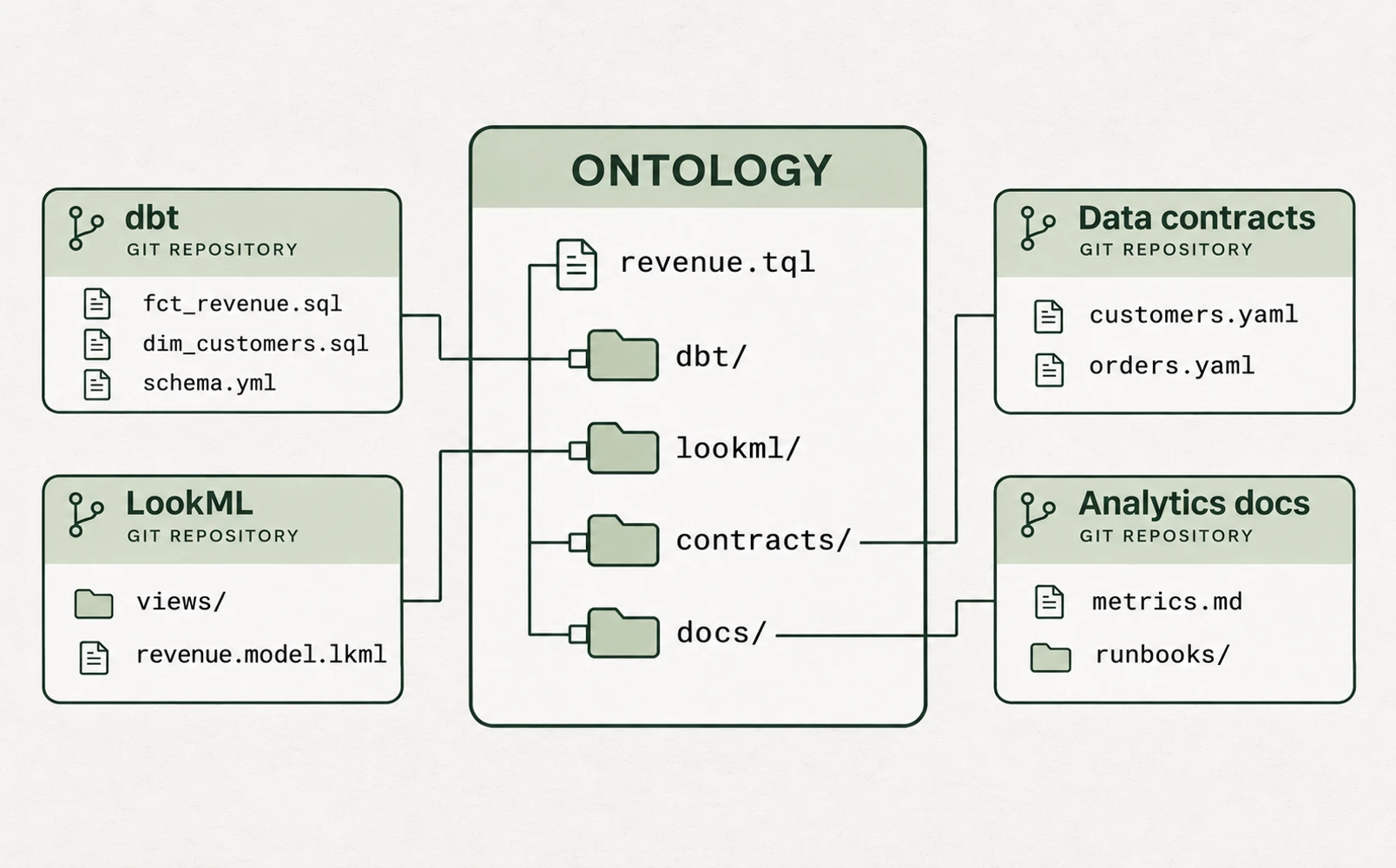
During a BI migration, for example, an attached modeling repo gives Ana access to the existing definitions while your team works on their replacements. A data contract can sit alongside the models it describes without moving either into a new repository.
Each repository appears as a folder, with a link back to its source. Its files load when the folder is opened. The folder follows its configured branch on every sync, and an Update button pulls the latest changes on demand.
Built on Git
Under the hood, each attached repository is a standard Git submodule. The Ontology records a reference to a commit in that repository, and sync advances it along the configured branch. TextQL fetches the files locally; your team does not need to maintain a separate exported copy.
Public repositories can be attached without credentials. For a private repository, connect a Git account that can reach it. Supported methods include the hosted GitHub App where available, an HTTPS access token, an SSH key, your own GitHub App, and AWS CodeCommit through the deployment's IAM role.
Accounts are scoped to a Git host and, optionally, an owner or group. TextQL selects the matching account for each repository. Credentials stay scoped to that host, and credentialed fetches refuse HTTP redirects.
Attach your first repository
- For a private repository, connect a Git account with access to it.
- Open the destination folder in the Ontology and choose + New > Attach Git repo.
- Enter the repository URL, a folder name, and an optional branch, then click Attach.
You need write access to the destination folder. Repositories are limited to 500 MiB, and the initial clone has a two-minute timeout. Use a Git account for credentials rather than embedding them in the URL.
See the release notes and Ontology setup guide for more on getting started.